Travis Scott's vocals sit somewhere between rap and sound design: heavily tuned, gritty, drenched in dark space, with ad-libs bouncing around the stereo field. It sounds complicated, but it's built from a clear set of moves. Here's a step-by-step chain to get a similar sound on your own vocal.
We're not affiliated with Travis Scott or his team. This describes how to approach a similar sound, based on what you can hear on the records.
What you're hearing
- Hard pitch correction used as an instrument, not just for fixing notes.
- Grit and saturation that make the vocal feel aggressive and present, even when it's buried in effects.
- Dark, long reverb and delay throws that create a psychedelic, cavernous space.
- Layers of ad-libs, often pitched, filtered or panned hard, around the main vocal.
- Energy over polish. It's meant to feel raw and loud, not clean and delicate.
Step 1: Record with energy
- Record close to the mic with a pop filter, and keep the room as dry as you can. The space gets added later.
- Perform it loud and confident. A big part of this sound is the delivery.
- Record the lead, a double for the hooks, and plenty of ad-libs on separate tracks. You'll treat them differently later.
Make sure your levels leave headroom: our guide on how to record vocals at home covers gain staging.
Step 2: Hard tune
- Key and scale: the song's correct key. Check it before anything else.
- Retune speed: as fast as it goes (0 to 10 ms) for the classic effect.
- Humanize: off.
The hard tune is part of the character here, so let it be audible on slides and held notes.
Step 3: EQ for an aggressive midrange
- High-pass around 100 to 120 Hz.
- Cut mud around 250 to 400 Hz if needed.
- Push the mids and presence: a boost around 1 to 3 kHz gives that forward, slightly harsh edge. Be careful, a little goes a long way.
- Don't overdo the air. This sound is darker on top than a pop vocal; a gentle shelf is enough.
Step 4: Compression and grit
- Compression: heavier than a pop vocal. Try 4:1 to 6:1 with a fast-ish attack and 6 to 10 dB of gain reduction, or two compressors in a row sharing the work.
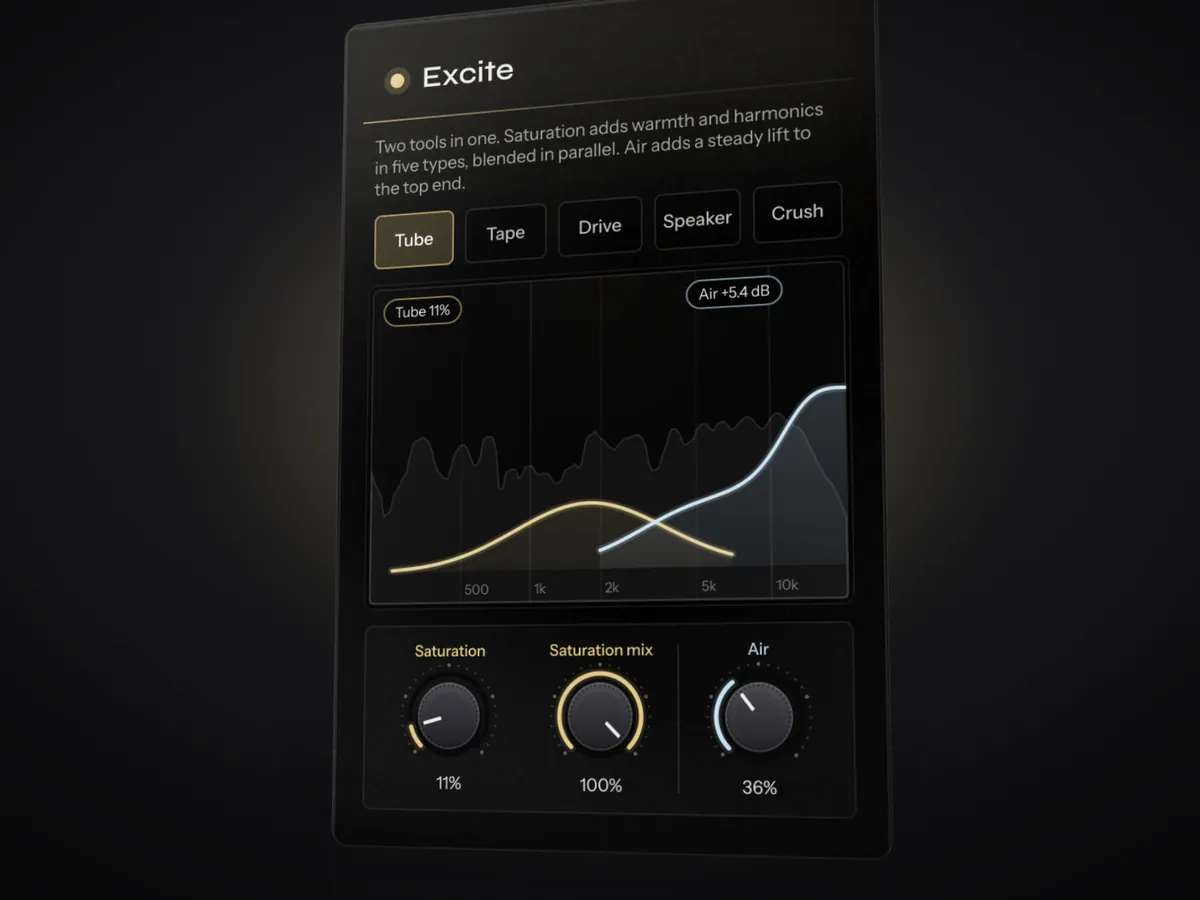
- Saturation or distortion: this is key. Use tube or tape saturation for warmth, or a distortion in parallel (on a send, blended in) for real grit. Parallel lets you keep the words clear while adding attitude.
- De-ess after the saturation, since distortion makes esses harsher.
Step 5: Dark space and throws
- Reverb: a long hall or plate, 3 seconds or more, on a send. Low-pass it around 3 to 5 kHz for a darker tail, and high-pass it around 300 to 500 Hz.
- Delay throws: instead of delay on everything, automate a delay send up on the last word of a phrase. Use 1/4 or 1/2 note delays with higher feedback for that trailing echo.
- Modulation: a chorus, flanger or phaser on the reverb or delay return adds movement.
- Ducking: duck the effects under the lead so the words stay readable.
Step 6: Ad-libs that sound like the records
- Pan ad-libs hard left and right, and vary them per phrase.
- Filter them (telephone-style band-pass, or just thinner) and give them more reverb than the lead.
- Pitch some of them down an octave for those deep, dark responses, or up an octave for a ghostly layer.
- Keep them lower than you'd think. They should surround the lead, not compete with it.
A quick starting point with Instinct
Instinct can set up the core of this chain for you. Put it on the lead and press play: it analyses the vocal, then sets EQ, compression, de-essing, saturation, width, delay and reverb for that recording. For this style:
- Turn on Tune and set the retune speed as fast as it goes.
- Turn Intensity up past the middle for more grit and space, and raise Saturation in the Excite module.
- Pick Hall in the Reverb module and let the ducking keep the words clear.
- On ad-lib tracks, use Creative FX → Pitch at −12 semitones for dark octave-down layers.
Download the free beta and try it on a vocal.
Common mistakes
- Too much clean polish. This sound wants grit; don't over-smooth it.
- Effects on everything all the time. Throws on phrase endings sound bigger than constant delay.
- Ad-libs too loud and too centred. Pan them, filter them, and push them back.
FAQ
What autotune does Travis Scott use?
Travis Scott is well known for heavy use of Auto-Tune, but the specific settings on each record aren't public. To get close, use a fast retune speed, the correct key, and no humanize, then add saturation and effects around it.
How do I get the dark, psychedelic reverb?
Use a long reverb (3 seconds or more), roll off the top end so it sounds dark, high-pass the low end, and add delay throws on phrase endings. Modulation such as chorus or a phaser on the effect returns adds the psychedelic movement.
Why do my ad-libs sound messy?
Usually they're too loud, too dry or all in the centre. Pan them wide, turn them down, filter them, and give them more reverb and delay than the lead so they sit behind it.