Don Toliver's vocals are some of the most recognisable in melodic rap: smooth, high, glassy and floating in a huge space, with harmonies stacked around the lead. The good news is that the sound comes from a handful of clear decisions, not from secret gear. This guide walks through the full chain, in order, with settings you can start from.
We're not affiliated with Don Toliver or his team. This is how we approach getting a similar sound on your own vocals, based on what you can hear on the records.
What makes the Don Toliver vocal sound
Before touching a plugin, it helps to name what you're hearing:
- Hard, clean pitch correction. The notes snap into place, especially on held notes and slides, but the tone stays smooth rather than robotic.
- A higher, softer delivery. Much of the sound is the performance: a light, airy tone sitting in the upper register, often moving into falsetto.
- Stacks. Doubles under the lead, harmonies on the hooks, and ad-libs placed around the stereo field.
- A bright, polished top end with the esses still under control.
- A big, washed-out space. Long reverb and delays that are filtered, so they sound dreamy rather than muddy.
Step 1: Record it right
No mix chain fixes a weak recording. For this style:
- Record close to the mic (about 15 to 20 cm), with a pop filter, so you capture a clean, intimate tone.
- Keep the recording dry. Record in your quietest, most "dead" space, because the reverb comes later and you want full control of it.
- Sing in the register the song needs, and lean into a softer delivery on the higher lines.
- Record the full set while the vibe is there: the lead, a tight double of each hook, a harmony a third above (and sometimes below), and ad-libs on separate tracks.
If you're recording at home, our guide on how to record vocals at home covers mic placement, levels and room treatment.
Step 2: Hard pitch correction
Put pitch correction first on the lead (Auto-Tune, Melodyne in real time, or your DAW's stock tuner).
- Key and scale: set the song's real key. A wrong scale is the number one reason tuned vocals sound off.
- Retune speed: fast, roughly 0 to 15 ms, for that snapped sound. Go slower (20 to 40 ms) on very expressive lines if it starts to sound warbly.
- Humanize: low or off for the effect; raise it a little if long notes sound frozen.
Tune the doubles and harmonies the same way so they lock with the lead.
Step 3: Clean up and shape the tone with EQ
- High-pass filter around 100 to 150 Hz. This style lives in the mids and highs, and a lean low end keeps the stack from getting muddy.
- Cut mud with a gentle cut somewhere between 200 and 500 Hz if the vocal sounds thick or boxy.
- Add presence with a small, wide boost around 3 to 5 kHz so the words cut through.
- Add air with a high shelf from around 10 to 12 kHz. This is a big part of the glassy sound.
Our vocal EQ cheat sheet has every frequency range and what to listen for.
Step 4: Compression and saturation
Melodic vocals need to sit at a steady level so every word of the hook reads.
- First compressor: around 3:1 to 4:1, medium attack (10 to 20 ms), release fast enough to recover between words, 3 to 6 dB of gain reduction.
- Second stage: a faster compressor or a limiter catching only the peaks, 2 to 3 dB.
- Saturation: a little tape or tube saturation adds harmonics and makes the vocal feel expensive. Keep it subtle; you should miss it when it's off, not hear it when it's on.
Step 5: De-ess after you brighten
Boosting air also boosts S, SH and T sounds. Put a de-esser after the EQ boost, targeting roughly 5 to 9 kHz, and aim for about 3 to 6 dB of reduction on the esses only. If the vocal starts lisping, back it off.
Step 6: The space: filtered reverb and delays
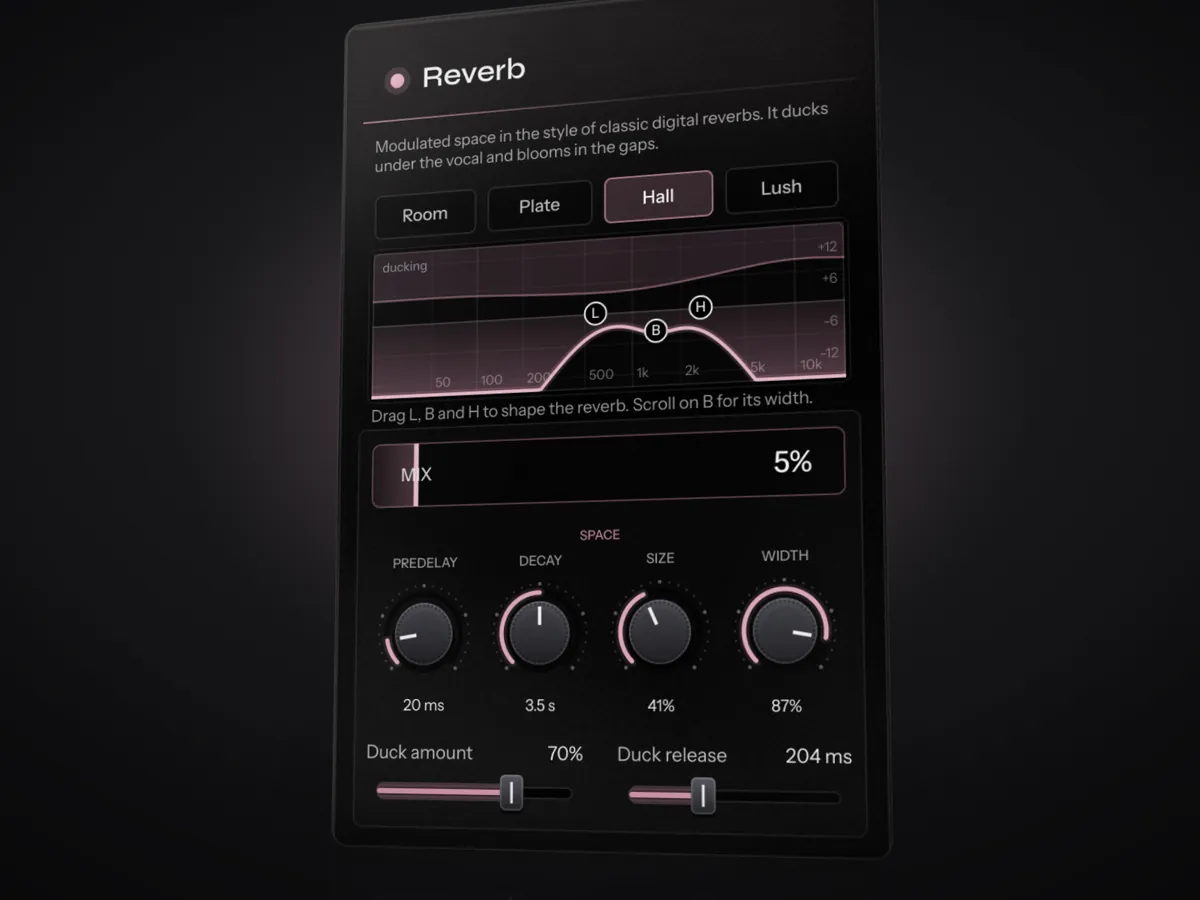
This is where the Don Toliver sound really comes together. Put reverb and delay on sends (or set their mix low on the insert), and shape them carefully:
- Reverb: a hall or large plate with around 2.5 to 3.5 seconds of decay and 20 to 40 ms of pre-delay, so the words stay clear before the tail starts.
- Filter the reverb: high-pass it around 400 to 600 Hz and low-pass it around 2.5 to 6 kHz. Filtering is what makes a long reverb sound dreamy instead of washy.
- Delay: a tempo-synced 1/4 or dotted 1/8 with a little feedback, filtered the same way.
- Ducking: let the vocal turn the reverb and delay down while it's singing, so they bloom in the gaps. Many reverbs and delays have a ducking control; otherwise use a sidechain compressor on the send.
Step 7: Width and stacks
- Pan the doubles and harmonies left and right (for example 60 to 100%), keep the lead in the centre.
- Turn the stacks down further than you think, and EQ them a bit brighter and thinner than the lead.
- Pan ad-libs wide and give them more reverb than the lead for depth.
- For extra shimmer, a quiet octave-up layer of the lead on the hooks (pitch-shifted, low in the mix) adds that floating quality.
A quick starting point with Instinct
If you'd rather start from a finished chain and adjust from there, Instinct does most of the steps above automatically. Put it on the lead vocal and press play: it listens for a few seconds, then sets up EQ, compression, de-essing, saturation, width, a filtered and ducked delay and reverb for that recording. For this style:
- Turn on Tune, set the key, and bring the retune speed down for the snapped sound.
- Push Intensity up a little for more polish and space.
- In Creative FX, try the Pitch effect at +12 semitones with a low mix for an octave-up shimmer.
Every module stays open, so you can fine-tune it like the chain above. Download the free beta and try it on your own vocal.
Common mistakes
- Wrong key in the tuner. Always check the key first.
- Too much low end in the stack. Filter the doubles and harmonies harder than the lead.
- Unfiltered reverb. A full-range 3-second reverb turns into mud fast.
- Over-de-essing. If the singer sounds like they have a lisp, ease off.
FAQ
What autotune settings does Don Toliver use?
The exact settings on his records aren't public, but the sound is a fast retune speed (roughly 0 to 15 ms), the song's correct key and scale, and little to no humanize. Getting the key right matters more than the plugin you use.
How do I get the airy, spacey sound in my vocals?
Brighten the top end with a high shelf around 10 to 12 kHz, de-ess after it, then send the vocal to a long reverb and a tempo-synced delay. Filter the low end and the very top out of both, and duck them under the vocal so the space blooms in the gaps.
Can I get this sound without expensive plugins?
Yes. Stock pitch correction, EQ, compression and reverb in Logic, FL Studio or Ableton can get you most of the way. The recording, the key and the layering matter more than any single plugin.